How a Browser Works: A Beginner-Friendly Guide to Browser Internals
What Happens After You Type a URL and Press Enter?


When you type a URL like www.example.com and press Enter, something incredible happens behind the scenes. In less than a second, your browser contacts servers across the world, downloads files, builds structures in memory, calculates layouts, and finally paints pixels on your screen.
A browser is not just a tool that “opens websites.” It is a complex software system made up of multiple components working together like a team.
Let’s understand this step by step — in a simple, story-driven way.
What Is a Browser, Really?
A browser is a software application that:
Requests web content from servers
Interprets HTML, CSS, and JavaScript
Converts them into visual pages
Displays them on your screen
Popular browsers include Google Chrome (Chromium engine) and Mozilla Firefox (Gecko engine). While their internal implementations differ slightly, the overall process is similar.
You can think of a browser as a translator and painter. It reads web languages (HTML, CSS, JS) and turns them into something humans can see and interact with.
Main Parts of a Browser (High-Level View)
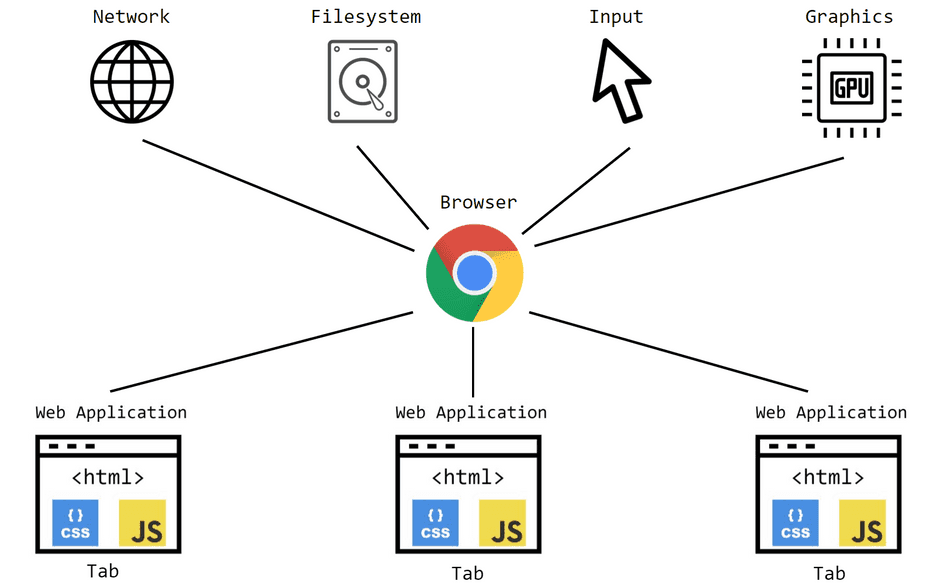
A browser has several major components:
User Interface (UI)
Browser Engine
Rendering Engine
Networking Component
JavaScript Engine
Each one plays a specific role in turning code into visuals.
User Interface (UI)
The user interface includes:
Address bar
Back/forward buttons
Tabs
Bookmark bar
This is the part you interact with directly. When you type a URL, the UI sends that request to the browser engine to begin processing.
Think of the UI as the control panel of the browser.
Browser Engine vs Rendering Engine
The Browser Engine acts as a coordinator. It connects the user interface with the rendering engine.
The Rendering Engine is responsible for displaying content on the screen. It takes HTML and CSS and converts them into visible content.
In simple terms:
Browser Engine → Manager
Rendering Engine → Builder and Painter
The rendering engine does the heavy lifting.
Networking: Fetching HTML, CSS, and JS
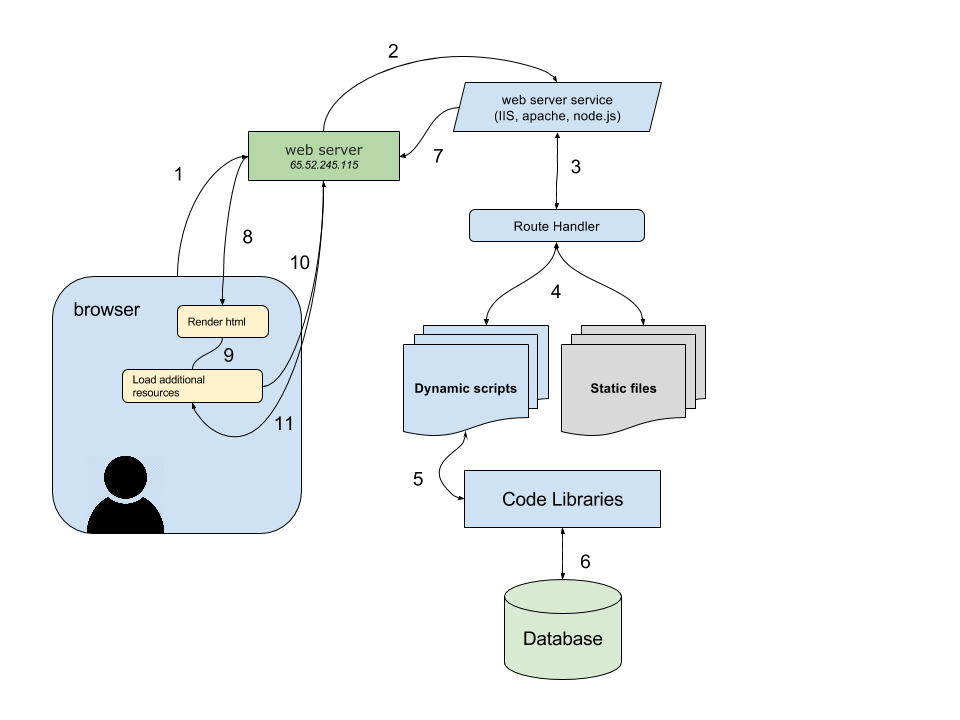

Once you press Enter:
The browser sends an HTTP request to the server.
The server responds with HTML.
The browser may then request additional files like CSS, JavaScript, and images.
This process is handled by the browser’s networking layer.
Think of this like ordering food:
You place an order (request)
The restaurant sends your food (response)
HTML Parsing and DOM Creation



When the browser receives HTML, it doesn’t display it immediately. First, it parses it.
Parsing means breaking something into meaningful pieces.
For example:
If you see:2 + 3 × 4
Your brain builds a structure to understand it:
Multiply first
Then add
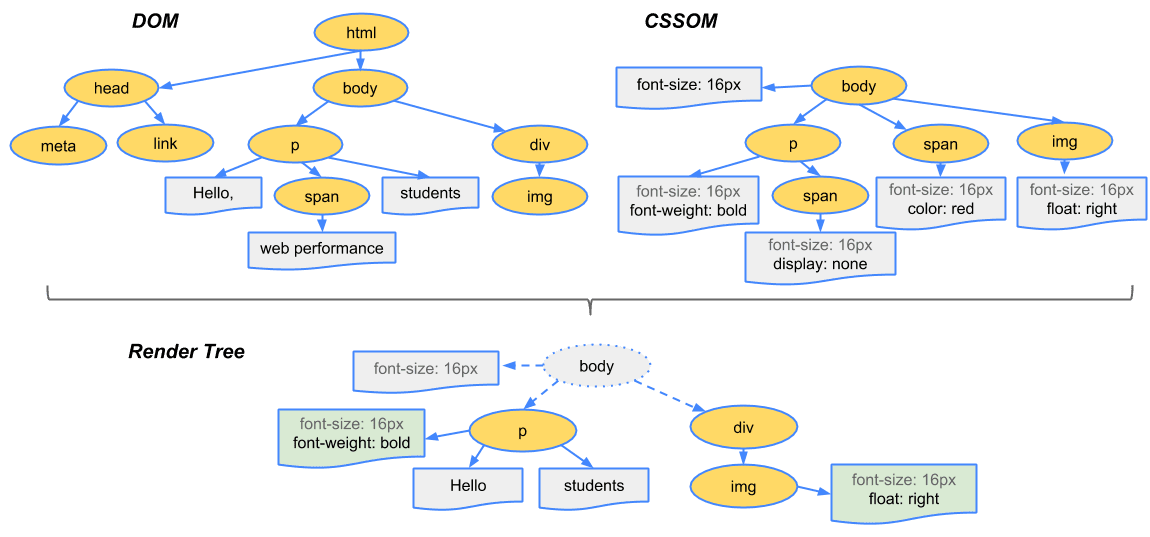
Similarly, the browser reads HTML and builds a structure called the DOM (Document Object Model).
The DOM is like a tree:
<html>is the root<body>is a branch<div>,<p>,<h1>are smaller branches
The browser turns HTML text into a tree structure in memory.
CSS Parsing and CSSOM Creation

Next, the browser parses CSS.
Just like HTML creates the DOM, CSS creates something called the CSSOM (CSS Object Model).
If DOM is the structure of the house,
CSSOM is the styling instructions:
Colors
Fonts
Sizes
Positions
CSS rules are organized into another tree-like structure.
DOM + CSSOM = Render Tree

Now the magic happens.
The browser combines:
DOM (structure)
CSSOM (style rules)
This combination forms the Render Tree.
The Render Tree contains only visible elements and includes styling information.
It answers:
What should be displayed?
How should it look?
Layout (Reflow), Painting, and Display

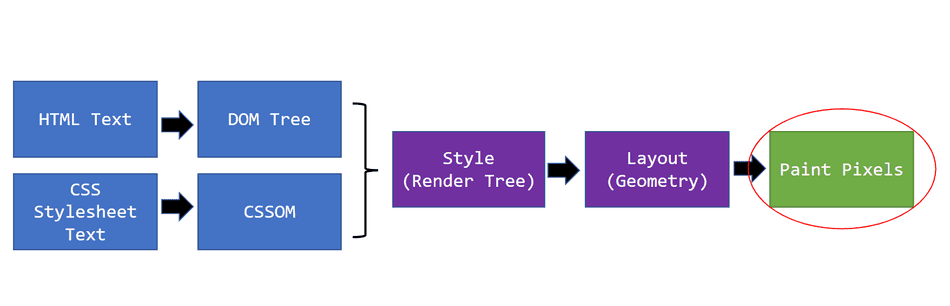
After creating the Render Tree, the browser performs:
Layout (Reflow)
It calculates:
Exact positions
Widths
Heights
This determines where every element should appear on the page.
Painting
The browser fills in:
Colors
Borders
Text
Images
Display
Finally, everything is converted into pixels and shown on your screen.
From URL to pixels — that’s the full journey.
Full Flow Summary
The entire process looks like this:
You type a URL
Browser sends HTTP request
Server sends HTML
HTML → DOM
CSS → CSSOM
DOM + CSSOM → Render Tree
Layout → Paint → Display
All of this happens in milliseconds.